Map of Areas
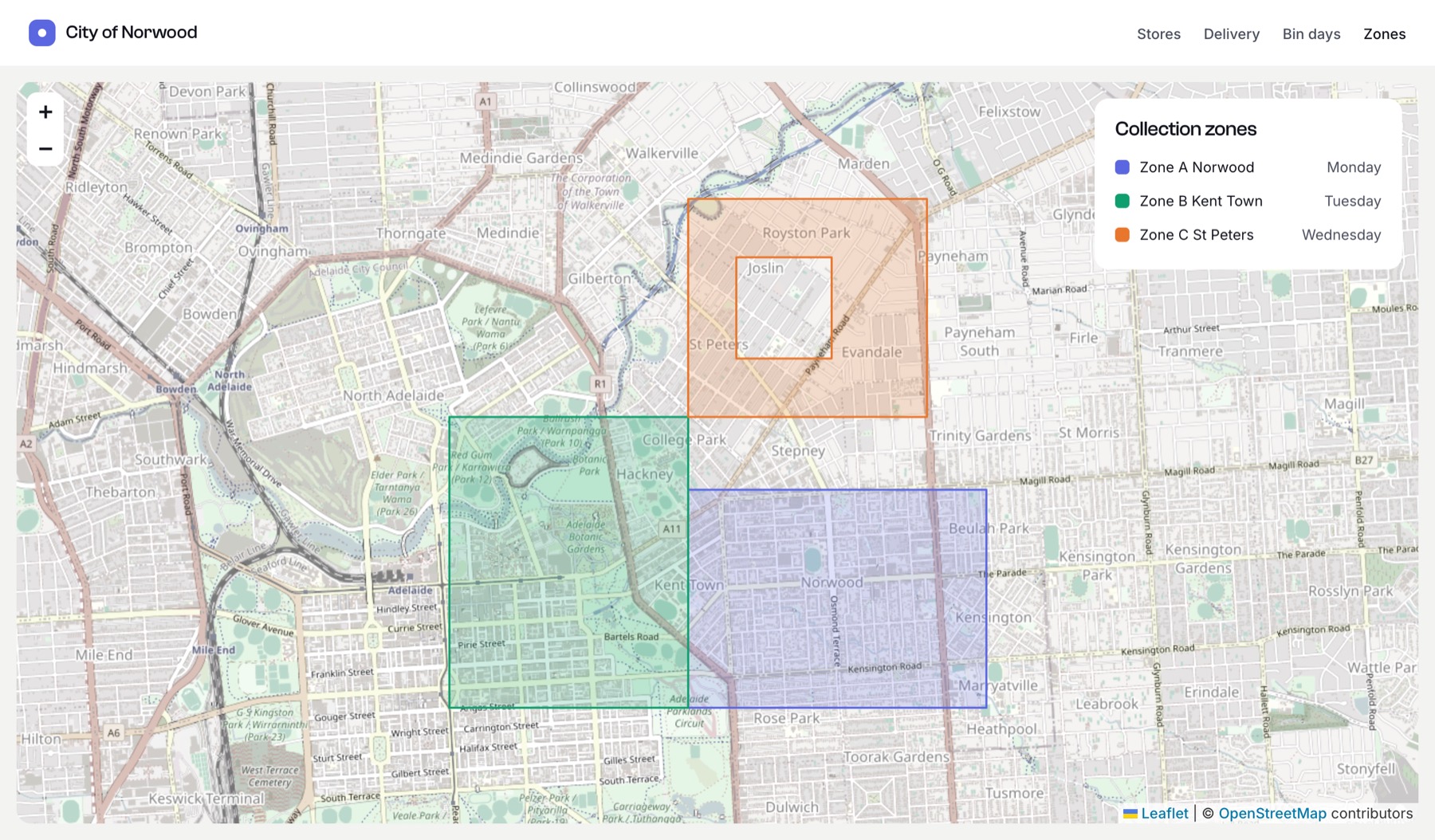
Show every zone, region or delivery area on a single map, each in its own colour with its name in a popup.
The template
twig
{% set zones = craft.entries()
  .section('binZones')
  .zoneArea(':notempty:')
  .all() %}

{% set colours = ['#2563eb', '#16a34a', '#f59e0b', '#db2777', '#7c3aed'] %}

{# Merge each entry's shapes into one FeatureCollection, tagged with the entry's name and a colour #}
{% set features = [] %}
{% for zone in zones %}
  {% set colour = colours[loop.index0 % colours|length] %}
  {% set data = zone.zoneArea.getGeoJsonData() ?? {} %}
  {# Shapes can be a FeatureCollection, a single Feature or a bare geometry #}
  {% set zoneFeatures = data.type is not defined ? []
    : (data.type == 'FeatureCollection' ? data.features
    : (data.type == 'Feature' ? [data]
    : [{ type: 'Feature', geometry: data, properties: {} }])) %}
  {% for feature in zoneFeatures %}
    {% set features = features|merge([feature|merge({
      properties: (feature.properties ?? {})|merge({ name: zone.title, color: colour }),
    })]) %}
  {% endfor %}
{% endfor %}

{{ craft.geomaps.embed({
  id: 'zones-map',
  width: 900,
  height: 500,
  marker: false,
  geoJson: { type: 'FeatureCollection', features: features },
}) }}

<ul class="legend">
  {% for zone in zones %}
    <li>
      <span style="background: {{ colours[loop.index0 % colours|length] }}"></span>
      {{ zone.title }}
    </li>
  {% endfor %}
</ul>
The map zooms to fit all the shapes. marker: false hides the centre pin, because the map has no single location.
Styling shapes
Embedded maps style each shape from its properties, so authors can also set them in the field’s shape panel:
| Property | Effect |
|---|---|
color | Outline and fill colour |
stroke | Outline colour (overrides color) |
fill | Fill colour (overrides color) |
weight | Line width in pixels (default 2 for areas, 4 for lines) |
name or title | Shown in a popup when the shape is clicked |
These work on both OpenStreetMap (Leaflet) and Google maps.
Using your own map library
For full control, pass the GeoJSON to Leaflet, MapLibre or OpenLayers yourself:
twig
<div id="areas" style="height: 500px"></div>
<script src="https://unpkg.com/leaflet@1.9.4/dist/leaflet.js"></script>
<link rel="stylesheet" href="https://unpkg.com/leaflet@1.9.4/dist/leaflet.css">
<script>
const map = L.map('areas');
L.tileLayer('https://tile.openstreetmap.org/{z}/{x}/{y}.png', {
attribution: '© OpenStreetMap contributors',
}).addTo(map);
const layer = L.geoJSON({{ { type: 'FeatureCollection', features: features }|json_encode|raw }}, {
style: (f) => ({ color: f.properties.color, weight: 2, fillOpacity: 0.25 }),
onEachFeature: (f, l) => l.bindPopup(f.properties.name),
}).addTo(map);
map.fitBounds(layer.getBounds());
</script>features is the list built in the template above.