Live Map Search
Results that update as the visitor pans and zooms, with no page reload. A small Twig template returns stores as JSON, and a few lines of JavaScript call it whenever the map stops moving.
1. The JSON endpoint
templates/api/stores.json.twig returns the stores nearest a point. Craft serves it at /api/stores.json.
twig
{%- header "Content-Type: application/json" -%}
{%- set request = craft.app.request -%}
{%- set lat = request.getQueryParam('lat') -%}
{%- set lng = request.getQueryParam('lng') -%}
{#- Keep the radius sensible so nobody can ask for the whole world -#}
{%- set radius = min(max(request.getQueryParam('radius')|float, 1), 200) -%}

{%- set stores = lat is numeric and lng is numeric
  ? craft.entries()
      .section('stores')
      .storeLocation({ location: { lat: lat, lng: lng }, radius: radius })
      .limit(20)
      .all()
  : [] -%}

{{- {
  count: stores|length,
  stores: stores|map(s => {
    title: s.title,
    url: s.url,
    address: s.storeLocation.address1 ~ ', ' ~ s.storeLocation.suburb,
    lat: s.storeLocation.lat,
    lng: s.storeLocation.lng,
    distance: s.storeLocation.distance,
  })|values,
}|json_encode|raw -}}
Try it: /api/stores.json?lat=-34.93&lng=138.6&radius=10
json
{ "count": 3, "stores": [{ "title": "Adelaide CBD Store", "address": "1 King William St, Adelaide", "lat": -34.9285, "lng": 138.6007, "distance": 0.178, … }] }Coordinates go straight to the search index without geocoding, so each request is a single fast database query.
2. The page
twig
{% extends '_layout' %}

{% block content %}
  <div class="finder">
    <aside>
      <h1>Stores on the map</h1>
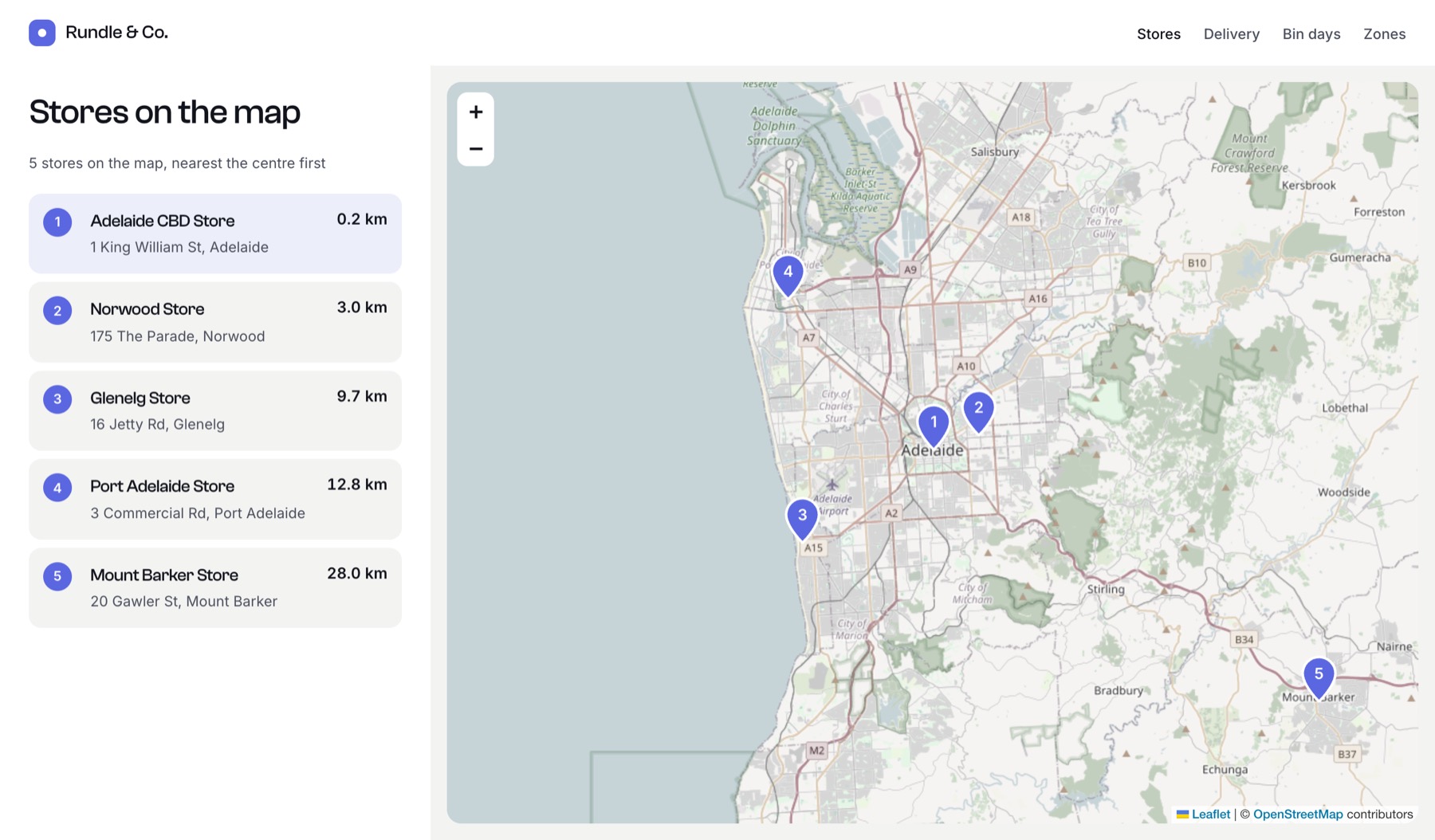
      <p id="meta" aria-live="polite">Move the map to search.</p>
      <ol id="results"></ol>
    </aside>
    <div id="map"></div>
  </div>

  <link rel="stylesheet" href="https://unpkg.com/leaflet@1.9.4/dist/leaflet.css">
  <script src="https://unpkg.com/leaflet@1.9.4/dist/leaflet.js"></script>
  {% set geo = craft.app.plugins.getPlugin('geomaps').settings %}
  <script>
    const map = L.map('map').setView([-34.93, 138.6], 11);
    L.tileLayer({{ geo.getTileUrl()|json_encode|raw }}, {
      attribution: {{ geo.tileAttribution|json_encode|raw }},
    }).addTo(map);

    const pins = L.layerGroup().addTo(map);
    const results = document.getElementById('results');
    const meta = document.getElementById('meta');
    const esc = (s) => String(s).replace(/[&<>"']/g, (c) => `&#${c.charCodeAt(0)};`);
    let controller;

    async function search() {
      // Search the circle that covers the visible map.
      const centre = map.getCenter();
      const radius = Math.ceil(map.distance(centre, map.getBounds().getNorthEast()) / 1000);

      controller?.abort(); // drop the previous request if the map moved again
      controller = new AbortController();
      const params = new URLSearchParams({ lat: centre.lat.toFixed(5), lng: centre.lng.toFixed(5), radius });
      const response = await fetch('/api/stores.json?' + params, { signal: controller.signal });
      const { count, stores } = await response.json();

      pins.clearLayers();
      stores.forEach((s, i) => L.marker([s.lat, s.lng], { title: s.title }).addTo(pins));
      results.innerHTML = stores.map((s) => `
        <li><a href="${esc(s.url)}">${esc(s.title)}</a> ${s.distance.toFixed(1)} km<br>${esc(s.address)}</li>`).join('');
      meta.textContent = count ? `${count} stores on the map, nearest the centre first` : 'No stores here. Zoom out or move the map.';
    }

    map.on('moveend', () => search().catch((e) => e.name === 'AbortError' || console.error(e)));
    search();
  </script>
{% endblock %}
This page draws its own Leaflet map because it redraws the pins itself. It reads Map Tiles URL and Map Credit from the plugin settings, so it matches your other maps.
Going further
- Numbered pins. Swap
L.markerfor anL.divIconwith the result’s number inside, and number the list to match, as in the screenshot. - Search box. Add an address input and send
qinstead oflat/lng; in the endpoint, passlocation: qand Geo Maps geocodes it. - Caching. Wrap the endpoint’s query in
{% cache using key "stores-#{lat}-#{lng}-#{radius}" for 10 minutes %}on busy sites. - Headless. The same query works in GraphQL if your front end is not Twig.