
Location Page
A detail page for a single place, such as a store, venue or office: the address, a map, a directions link and other places nearby.
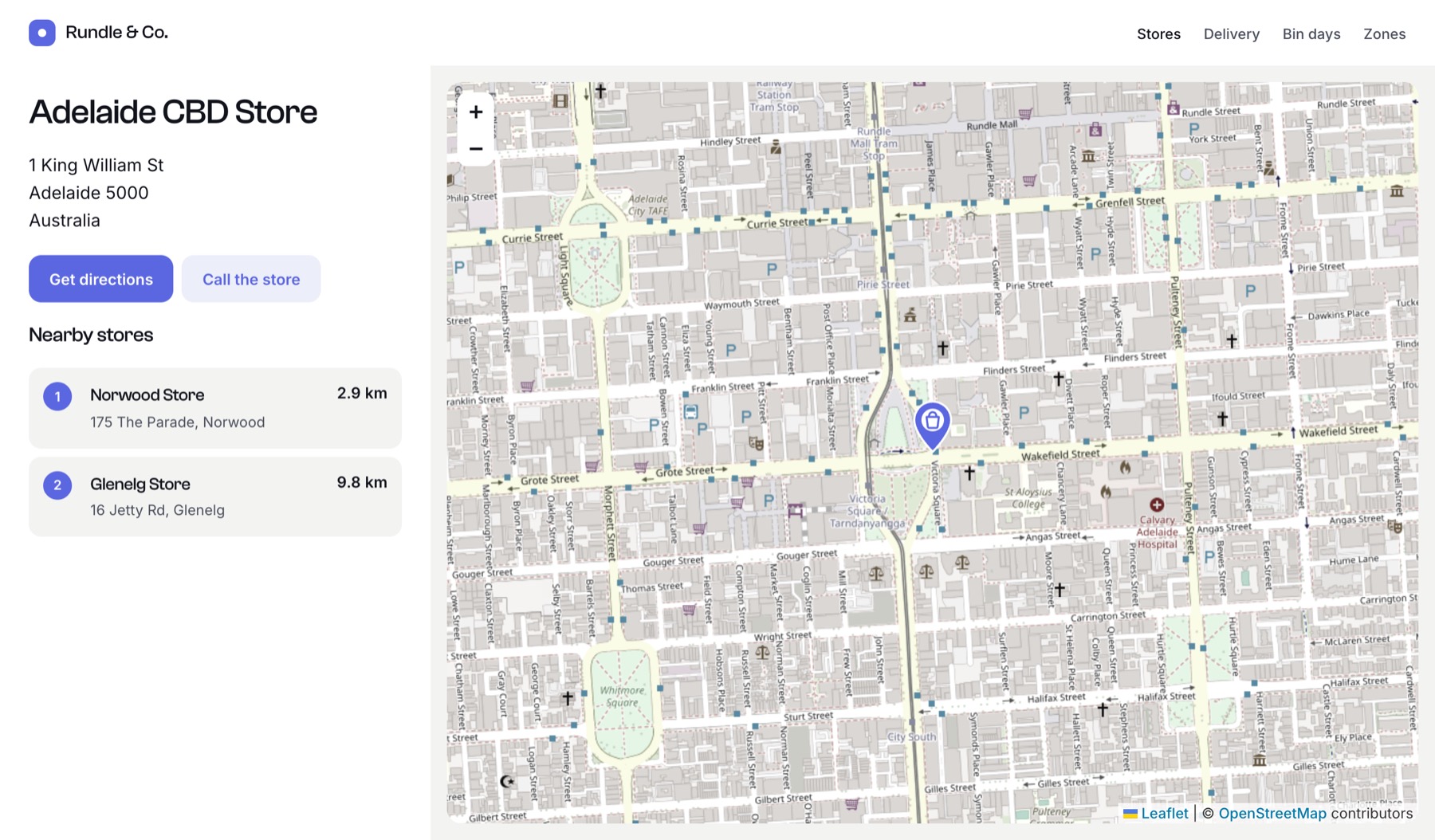
The template
templates/stores/_entry.twig:
twig
{% extends '_layout' %}

{% set place = entry.storeLocation %}

{% block content %}
  <h1>{{ entry.title }}</h1>

  {% if place and place.hasCoordinates() %}
    <address>
      {{ place.address1 }}<br>
      {{ place.suburb }} {{ place.postcode }}<br>
      {{ place.country }}
    </address>

    <a href="https://www.google.com/maps/dir/?api=1&destination={{ place.lat }},{{ place.lng }}" target="_blank" rel="noopener">
      Get directions
    </a>

    {# Interactive map with a pin, plus any shapes drawn on the field #}
    {{ place.embed({ id: 'store-map', width: 900, height: 380, zoom: 15 }) }}

    {# Other stores within 10 km, nearest first #}
    {% set nearby = craft.entries()
      .section('stores')
      .storeLocation({ location: place, radius: 10 })
      .id(['not', entry.id])
      .limit(3)
      .all() %}

    {% if nearby|length %}
      <h2>Nearby stores</h2>
      <ul>
        {% for store in nearby %}
          <li>
            <a href="{{ store.url }}">{{ store.title }}</a>,
            {{ store.storeLocation.distance|number_format(1) }} km away
          </li>
        {% endfor %}
      </ul>
    {% endif %}
  {% endif %}
{% endblock %}
Passing the field value as location searches from its coordinates, so no geocoding happens.
Static map in listings
Interactive maps are heavy for listing pages and emails. Use a static image instead. Static images need a Google key with the Maps Static API enabled, so always check for null:
twig
{% for store in craft.entries().section('stores').all() %}
  {% set opts = { width: 400, height: 220, zoom: 14 } %}
  {% set src = store.storeLocation.img(opts) %}

  <article class="card">
    {% if src %}
      <img src="{{ src }}" srcset="{{ store.storeLocation.imgSrcSet(opts) }}"
           width="400" height="220" loading="lazy" alt="Map of {{ store.title }}">
    {% endif %}
    <h3><a href="{{ store.url }}">{{ store.title }}</a></h3>
    <p>{{ store.storeLocation }}</p>
  </article>
{% endfor %}
Printing the field value on its own (store.storeLocation) outputs the full address.
Structured data for search engines
Add the location to the page as schema.org data:
twig
{% if place and place.hasCoordinates() %}
  {% set schema = {
    '@context': 'https://schema.org',
    '@type': 'LocalBusiness',
    name: entry.title,
    url: entry.url,
    address: {
      '@type': 'PostalAddress',
      streetAddress: place.address1,
      addressLocality: place.suburb,
      postalCode: place.postcode,
      addressCountry: place.countryCode,
    },
    geo: { '@type': 'GeoCoordinates', latitude: place.lat, longitude: place.lng },
  } %}
  <script type="application/ld+json">{{ schema|json_encode|raw }}</script>
{% endif %}