Custom Pins & Info Windows
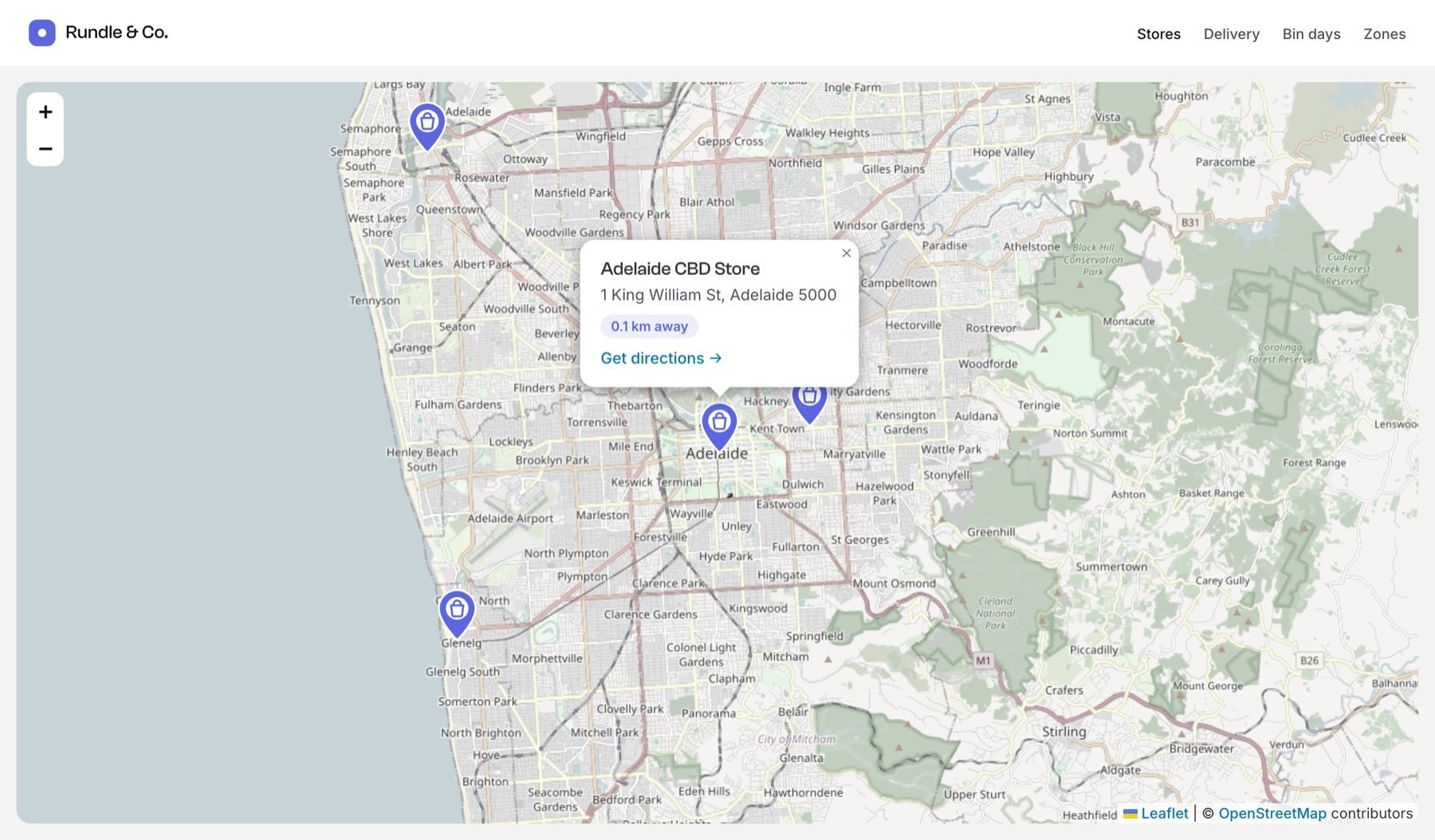
Use your own pin image and show a card with details when a pin is clicked. Works with both OpenStreetMap (Leaflet) and Google maps.
The template
{% set stores = craft.entries()
  .section('stores')
  .storeLocation({ location: 'Adelaide, South Australia', radius: 15 })
  .all() %}

{{ craft.geomaps.embed({
  id: 'stores-map',
  center: 'Adelaide, South Australia',
  zoom: 12,
  width: 900,
  height: 480,
  markers: stores|map((store, i) => {
    location: { lat: store.storeLocation.lat, lng: store.storeLocation.lng },
    label: store.title,
    icon: { url: '/images/store-pin.svg', width: 40, height: 52 },
    html: include('_partials/store-popup', { store: store }),
    open: i == 0,
  }),
}) }}templates/_partials/store-popup.twig:
<div class="store-popup">
  <strong>{{ store.title }}</strong>
  <p>{{ store.storeLocation.full_address }}</p>
  <p>{{ store.storeLocation.distance|number_format(1) }} km from the city centre</p>
  <a href="{{ store.url }}">View store →</a>
</div>
Style it with ordinary CSS on your page:
.store-popup { font: 14px/1.45 system-ui, sans-serif; min-width: 200px; }
.store-popup p { margin: 4px 0; color: #5f6b7a; }
Marker options
| Option | Description |
|---|---|
location | { lat, lng } or an address |
label | Plain text. Shown as the pin’s tooltip, and in the info window when there’s no html |
icon | Pin image: a URL, or { url, width, height } in pixels (default 32 × 32). The bottom centre of the image points at the location |
html | Info window content (HTML) |
open | Open this pin’s info window when the map loads |
color | Colour of the default round pin, used when there’s no icon |
Use any image for icon: an SVG or PNG in your web folder, or an asset’s URL (asset.url). Use an image about twice the display size for sharp pins on high-density screens.
Escape entry content in info windows
html is output as-is, so it can contain links and images. Twig escapes values in templates like the partial above automatically. If you build HTML another way, escape anything authors or visitors can edit with |e.
The same pin for every marker
Set icon once at the top level to use it for all markers:
{{ craft.geomaps.embed({
  center: 'Adelaide, South Australia',
  icon: { url: '/images/store-pin.svg', width: 40, height: 52 },
  markers: stores|map(store => {
    location: { lat: store.storeLocation.lat, lng: store.storeLocation.lng },
    label: store.title,
  }),
}) }}
A single location
embed() on a field value takes the same icon and html options for its pin:
{{ entry.storeLocation.embed({
  zoom: 15,
  icon: { url: '/images/store-pin.svg', width: 40, height: 52 },
  html: '<strong>' ~ entry.title|e ~ '</strong><br>' ~ entry.storeLocation.full_address|e,
}) }}
Download the pin used in the screenshot: store-pin.svg.
