Address Autocomplete in Forms
Add an address box with suggestions to your own forms. Visitors start typing, pick an address from the list, and the form sends its coordinates and address parts with it. Use it to save locations from front-end entry forms, or to search by address.
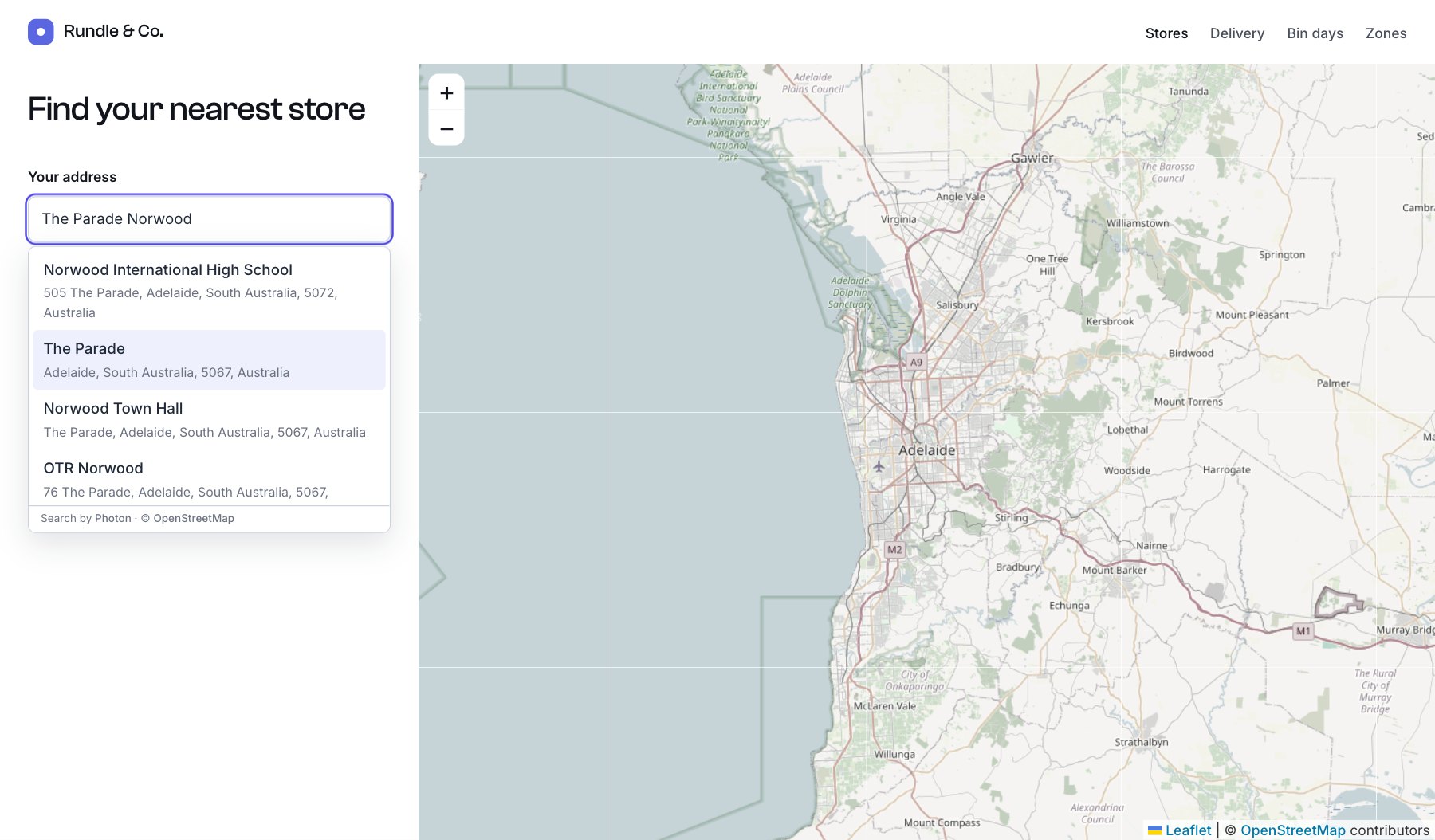
Suggestions come from Photon, an OpenStreetMap search service built for search-as-you-type, with the OpenStreetMap or Google Maps service. No API key is needed. With the Mapbox service, suggestions come from Mapbox instead (for boxes that save, with field or a name starting with fields[, only while mapboxPermanent is on, the default).
Save into a Geo Maps field
Pass the field’s handle and the input posts as fields[handle][…], in the same shape as the control panel field. It also limits suggestions to the countries chosen in the field’s settings, and suggests places near the field’s initial location first.
<form method="post">
  {{ csrfInput() }}
  {{ actionInput('entries/save-entry') }}
  {{ hiddenInput('sectionId', craft.app.entries.getSectionByHandle('stores').id) }}
  {{ redirectInput('stores/{slug}') }}

  <label for="store-title">Store name</label>
  <input id="store-title" type="text" name="title" required>

  <label for="store-address">Address</label>
  {{ craft.geomaps.addressInput({
    field: 'storeLocation',
    id: 'store-address',
    placeholder: 'Start typing the address',
    required: true,
  }) }}

  <button type="submit">Add store</button>
</form>
To edit an existing entry, pass its value so the box starts filled in:
{{ craft.geomaps.addressInput({
  field: 'storeLocation',
  value: entry.storeLocation,
}) }}
Front-end entry forms need the usual Craft setup: a logged-in user with permission to create entries in the section, or a guest-entries plugin.
Search by address
Give the input a name instead of a field, and read the coordinates on the results page. Searching by coordinates is faster than searching by address text, and nothing is sent to a geocoding service from your server.
{% set near = craft.app.request.getQueryParam('near') %}

<form method="get">
  <label for="near-address">Your address</label>
  {{ craft.geomaps.addressInput({
    name: 'near',
    id: 'near-address',
    value: (near.lat ?? false) ? near : null,
    countries: ['AU'],
    required: true,
  }) }}
  <button type="submit">Find stores</button>
</form>

{% if near.lat ?? false %}
  {% set stores = craft.entries()
    .section('stores')
    .storeLocation({ location: { lat: near.lat, lng: near.lng }, radius: 50 })
    .limit(5)
    .all() %}

  <ol>
    {% for store in stores %}
      <li>{{ store.title }} ({{ store.storeLocation.distance|number_format(1) }} km)</li>
    {% else %}
      <li>No stores within 50 km.</li>
    {% endfor %}
  </ol>
{% endif %}
Options
| Option | Description |
|---|---|
field | Handle of the Geo Maps field to save into. Sets name to fields[handle], and the default countries and near from the field’s settings. |
name | Name prefix for the inputs, such as near. The form sends near[full_address], near[lat], near[lng], near[address1], near[suburb], near[postcode], near[country] and near[countryCode]. Default location. |
value | Starting value: a field value (entry.storeLocation) or an array with the same keys. |
id | The text input’s id, for a <label for>. Generated when left out. |
label | An accessible label, for forms without a visible <label>. |
placeholder | Placeholder text. |
required | Whether an address is required. Default false. |
countries | Two-letter country codes to limit suggestions to, such as ['AU', 'NZ']. |
near | Suggest places near { lat, lng } first. |
minChars | Characters to type before suggestions appear. Default 3. |
class, inputClass | Extra classes for the wrapper and the text input. |
errorMessage | Shown when the form is sent with typed text but no chosen suggestion. Default “Choose an address from the list.” |
messages | Screen-reader text: { none: 'No matching addresses.', results: '{count} addresses found.' }. |
If a visitor types an address but doesn’t pick a suggestion, the form isn’t sent and the error message shows, because there are no coordinates to save. Changing the text after picking clears the old coordinates.
Styling
The box comes with light default styles. Change the colours with CSS custom properties, or style the classes yourself:
.geomaps-address {
  --geomaps-border: #d4d4d8;
  --geomaps-focus: #0f766e;
  --geomaps-active: #f0fdfa;
  --geomaps-radius: 4px;
}| Class | Element |
|---|---|
.geomaps-address | The wrapper. Gets .geomaps-address--chosen once an address is picked, and .geomaps-address--loading while searching. |
.geomaps-address__input | The text input |
.geomaps-address__list | The suggestions list |
.geomaps-address__option | A suggestion, with aria-selected="true" while highlighted |
.geomaps-address__main, .geomaps-address__secondary | A suggestion’s first line and its details |
.geomaps-address__error | The error message |
Reacting to a choice
The wrapper fires a geomaps:select event with the chosen values, for example to move a map or fill other fields:
document.addEventListener('geomaps:select', (e) => {
  console.log(e.detail.full_address, e.detail.lat, e.detail.lng);
});
Inputs added to the page later, such as in a modal loaded with fetch, start working after window.GeoMaps.initAddressInputs().
Accessibility
The box follows the ARIA combobox pattern. Visitors can use the up and down keys to move through suggestions, Enter to choose one and Escape to close the list, and screen readers announce how many addresses were found.
Privacy
While a visitor types, their browser sends the text to Photon (komoot), or Mapbox, to fetch suggestions. Mention this in your privacy policy; see Privacy and Data.