Locator Component
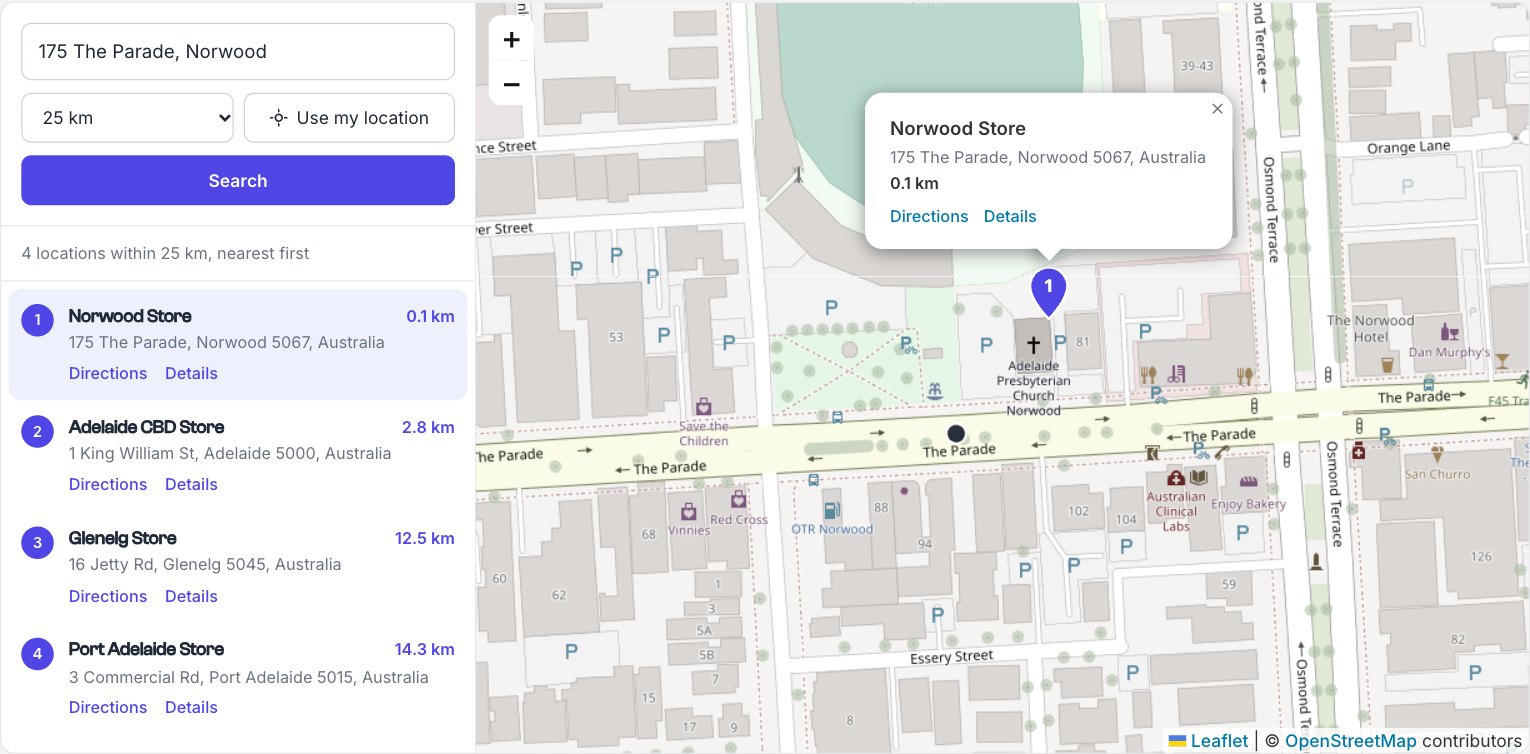
A complete “find the nearest” interface from one Twig tag, for stores, clinics, dealers, offices, events or any entries with a location: an address box with suggestions, Use my location, a distance filter, a numbered list of the nearest locations and a map with matching pins.
{{ craft.geomaps.locator({
  section: 'stores',
  field: 'storeLocation',
}) }}
That’s all that’s needed. The locator is a normal form that reloads the page with the search in the URL, so results are rendered on the server, can be bookmarked and shared, and work without JavaScript. With JavaScript, picking a suggestion searches straight away, changing the distance searches again, and clicking a result opens its pin on the map.
Before a search, it lists locations in the order of your query and shows them all on the map. After a search, it lists the nearest first, with the distance to each.
Options
| Option | Description | Default |
|---|---|---|
field | Handle of the Geo Maps field to search. Required. | — |
section | Section handle, or a list of handles | all sections |
query | A prepared element query instead of section, such as craft.entries.section('stores').relatedTo(category) | — |
radius | Starting search distance | 25 |
radii | Distances visitors can choose from | [5, 10, 25, 50, 100] |
unit | km or mi | km |
limit | Most locations to list | 20 |
countries | Two-letter country codes to limit address suggestions to | the field’s countries |
placeholder | Placeholder for the address box | “Address, suburb or postcode” |
color | Pin and accent colour, as a hex colour | '#4f46e5' |
mapHeight | Map height in pixels or a CSS length such as '70vh' | 520 |
cluster | Group nearby pins. Pro; on Lite pins are shown without grouping | true |
directionsUrl | Directions link, with {lat} and {lng} placeholders, or false to hide it | Google Maps directions |
resultTemplate | Your own template for each result’s content | — |
popupTemplate | Your own template for each pin’s info window | — |
name | Name prefix for the search in the URL, such as ?near[lat]=… | 'near' |
messages | Change any of the text; see below | — |
id, class | The locator’s id and extra classes | — |
Your own result and info window templates
resultTemplate and popupTemplate are site templates, rendered for each location with these variables:
| Variable | |
|---|---|
entry | The element, usually an entry |
location | Its Geo Maps value (location.address1, location.suburb, …) |
distance | Distance from the search, or null before a search |
unit | km or mi |
number | The result’s number, matching its pin |
{{ craft.geomaps.locator({
  section: 'stores',
  field: 'storeLocation',
  resultTemplate: '_partials/locator-result',
  popupTemplate: '_partials/locator-popup',
}) }}{# templates/_partials/locator-result.twig #}
<h3>{{ entry.title }}</h3>
{% if distance is not null %}<span>{{ distance|number_format(1) }} {{ unit }}</span>{% endif %}
<p>{{ location.address1 }}, {{ location.suburb }}</p>
<p>Open today {{ entry.openingHours }}</p>
<a href="{{ entry.url }}">Store details</a>The number badge stays beside your content, and clicking anywhere outside a link still opens the pin.
Filtering locations
Pass a query to search only some entries, such as stores in a category chosen in a filter:
{% set service = craft.app.request.getQueryParam('service') %}
{% set stores = craft.entries.section('stores') %}
{% if service %}
  {% set stores = stores.relatedTo(craft.categories.slug(service).one()) %}
{% endif %}

{{ craft.geomaps.locator({ query: stores, field: 'storeLocation' }) }}
The locator keeps the page’s other URL parameters, such as service, as hidden inputs in its search form, so searching again keeps the filter. See Locator with Filters.
Styling
The locator comes with clean default styles in a two-column layout that stacks on small screens. Change the colours with CSS custom properties:
.geomaps-locator {
  --geomaps-locator-accent: #0f766e;
  --geomaps-locator-line: #e7e5e4;
  --geomaps-locator-active: #f0fdfa;
  --geomaps-locator-radius: 4px;
}
Or style the classes: .geomaps-locator__panel, __form, __results, __result (with .is-active on the selected one), __number, __name, __distance, __address, __links and __map. The address box uses the address autocomplete classes.
Changing the text
Pass messages to translate or reword any text:
{{ craft.geomaps.locator({
  section: 'stores',
  field: 'storeLocation',
  messages: {
    search: 'Find stores',
    useMyLocation: 'Near me',
    results: '{count, plural, =1{1 store} other{# stores}} within {radius} {unit}',
    none: 'No stores within {radius} {unit}.',
  },
}) }}
Keys: search, address, distance, useMyLocation, locating, locationFailed, yourLocation, prompt, results, none, directions and details. All text also goes through Craft’s translations in the geomaps category.
Privacy
Address suggestions come from Photon (OpenStreetMap) in the visitor’s browser, or Mapbox with the Mapbox map service, and Use my location asks the browser for the visitor’s position, which is only sent to your own site as part of the search. See Privacy and Data.
Building your own
To build a locator by hand, with your own markup and behaviour, see the Store Locator example.